Set a wireless network and your own networking cable
Characters:
Theme: Wired and wireless communication: components, transmission methods and uses
Competencies
Mathematical competence in science, technology and engineering
Digital Competence
Subjects and year by Educational System
Spain > Digitisation > 4th ESO > Digital devices, operating and communication systems
Spain > Technology and digitisation > 3rd ESO > Digitisation of the personal learning environment
Enunciation

At the beginning of World War II, Hedy Lamarr and the composer George Antheil developed a patent for a radio guidance system for Allied torpedoes that used spread spectrum and frequency hopping technology to overcome the threat of jamming by the Axis powers. Although the US Navy did not adopt the technology until the 1960s, the principles of their work were tied to Bluetooth technology and are similar to the methods used in legacy versions of Wi-Fi. Nowadays, telecommunication technologies are widely extended across our society. In this context, we propose the following activity:
Set up a wireless network and set your own networking cable following the steps below.
Networking cables with RJ-45 modular connectors are made of UTP (Unshielded Twisted Pair) flexible cable. UTP, in turn, is formed by 4 pairs of twisted conductors, all of them with coloured insulation. One of the conductors in each pair has a set colour, and the other one is white with traces of the colour of the other. A typical subset of these colours is:
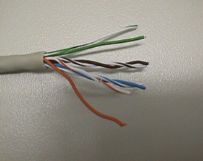 |
Orange. White/Orange. Green. White/Green. Blue. White/Blue. Brown. White/Brown. |
Steps:
- Cut a piece of cable of the desired length for your networking cable.
- Strip the cable jacket about 1,5 cm from the end where we are going to connect the RJ-45 modular connector. We need to be careful so as not to damage the insulation of the wires inside. We will use a crimping tool for this.
- Align the inside wires, along with their individual insulation, so that you can introduce them in the modular connector. The order should be as follows. Once the wires are aligned and put into order, we will cut their ends as straight as possible to even them out.
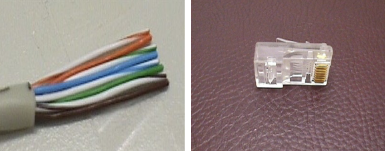 |
White/Orange. Orange. White/Blue. Blue. White/Green. Green. White/Brown. Brown. |
- The RJ-45 modular connector should be in the right position: the contact pins on top and the latch, under. Then, carefully insert the wires all the way into the modular connector. The wires should be aligned in the upper end of the modular connector, just below the golden contact pins. Make sure that all wires are inserted all the way into the connector. Check the order of wires taking into account the "point of view" of the connector:
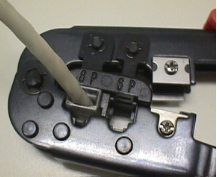 Introduce the RJ-45 modular connector inside the crimping tool and squeeze so that the golden contact pins are perfectly introduced and the wires are secured inside the connector.
- Next, we will repeat the steps on the other end of the wire.
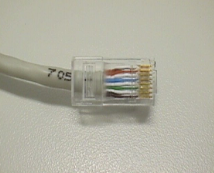
 Introduce the RJ-45 modular connector inside the crimping tool and squeeze so that the golden contact pins are perfectly introduced and the wires are secured inside the connector.
Observations and context
- This activity can be completed as part of the block of technology and society, which aims to study technological development, and to find out how the Internet has changed house appliances, through Nuria Oliver's studies.
- We can link this invention by Hedwig Kiesler (Hedy Lamarr) to other far-reaching inventions for industry and technological progress: GPS (Gladys Mae West), electronic book (Ángela Ruiz Robles), anti-reflective glass (Katharine Blodgett), vacuum packaging (Amanda Jones), fibre optic cable (Shirley Jackson), VoiP technology (Marian Croak), portable X-rays (Marie Curie) or the circular saw (Sarah Tabitha Babbitt).
Description
It is a practical exercise to be completed in class. Its main goal is:
- To introduce the components of wired and wireless communication networks.